
To expand on this method, I’ve been working on a Node-RED flow that pulls in data from a Microsoft SQL database and displays it on a groov page.
To make building the flow easier, the flow itself smaller, and certainly make maintenance easier I have written a bit of JavaScript that takes multiple rows of data and pushes it into six different groov tags at many indices all using a single write node thanks to the dynamic writing object in the post above.
When I SELECT three rows of data from the mssql node it comes back like this:
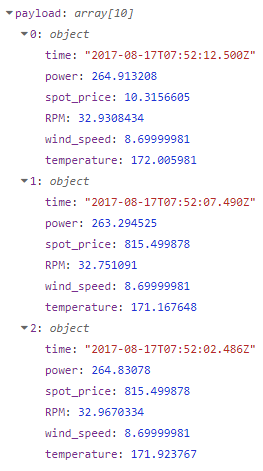
Which is a great format to sort through since each payload index represents one row, with each property being a column I select from the database, in this case six columns from the Opto turbine demo.
But this could be information from any other database or any other data source, even in a different format!
For example I often have data in Node-RED look like this:
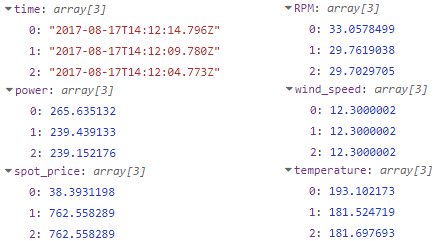
The important thing is that I have it in arrays in Node-RED, and I want the information in groov data store tables, each of length 3.
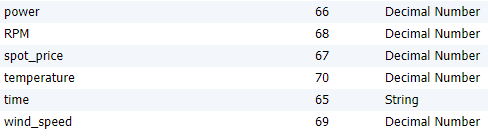
Regardless of the format in Node-RED, I want to be going through the arrays and push each property into a big array of write objects that follow the same dynamic template:
msg.payload = {
  tagName         : 'MyTagName',
  tableStartIndex : i,
  value           : data
} // one "write object"
Unlike the post above, however, I am not using the same tag for every single write, instead I am going to switch between the six tags time, power, spot_price, RPM, wind_speed, and temperature - one for each column of data - and I’m going to push three times that, once for each row.
This means I can write to eighteen unique gadgets in groov using a single write node, and it would be as simple as increasing the table size to any number ## and changing my query to SELECT TOP ## and Node-RED will dynamically take on the extra data – so I am not by any means limited to only eighteen.
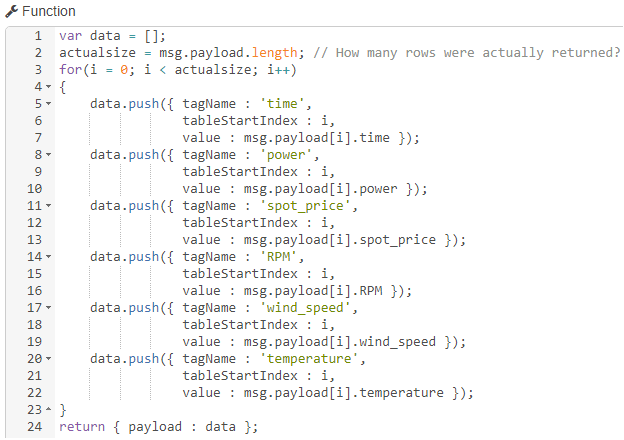
The JavaScript will look a little different depending on the original form of your data, but going through the MS SQL payload array, my code takes on this framework:
var data = [];
actualsize = msg.payload.length; // How many rows were actually returned?
for(i = 0; i < actualsize; i++)
{
    data.push({ tagName : 'first_tag',
                tableStartIndex : i,
                value : msg.payload[i].<first_column> });
    data.push({ tagName : 'second_tag',
                tableStartIndex : i,
                value : msg.payload[i].<second_column> });
    data.push({ tagName : 'third_tag',
                tableStartIndex : i,
                value : msg.payload[i].<third_column> });
    // . . . epeat for each column -> tag
}
return { payload : data }; // this object array becomes the new payload
Which in my case comes out looking like this:
Now it is going to seem like I really bloated out my payload, since I went from an array of length 3 to an array of length 18:
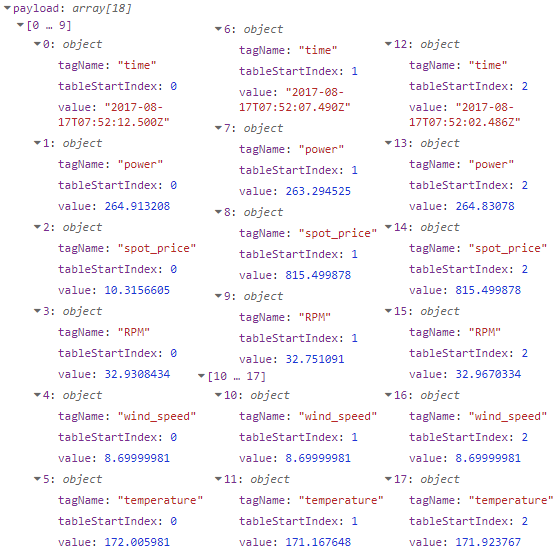
However this feeds straight into a split node to turn it into 18 separate payloads, and then one groov write node just like the above example, so all together my flow is quite small:
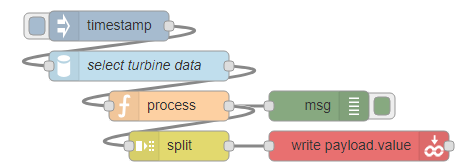
Where the final write node has Tag Name and Index fields empty so that it takes them dynamically from the payload propertes.
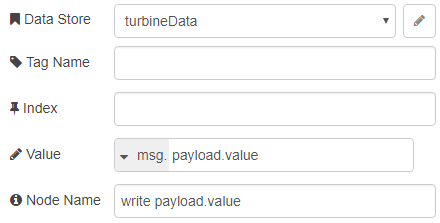
Using this one node I am writing to 18 gadgets composed of 6 different tags with 3 indices each:

Here is a roughly equevalent flow that uses a single gadget per write…

The other cool thing is that if I increase each table to take 4, 5, or even 50 table values it’s as simple as changing my select statement to select the TOP 50 instead of the TOP 3, and the write node dynamically keeps up, I don’t have to add more nodes!
(Of course 50 x 6 rows would require 300 gadgets to display, but I can keep the data in datastores without necessarily displaying them all, it all depends on what data you want, and what you want to do with it.)
Happy coding!