Hello! first post! Trying to use the RIO with port forwarding so my OPC client connected to ETH1 (10.131.16.202) can talk to my OPC server (wago PLC 10.0.0.202:4840) connected to ETH0, however the firewall rules are not being saved, and the port 14840 in ETH1 remains closed.
Static IP on both ETH0 10.0.0.200 and ETH1 10.131.16.200
When I test the port on ETH0 it looks good (OPEN) Host 10.0.0.200:4840.
But not on the ETH1 side -port is closed or the request timed out- on Host 10.131.16.200:14840.
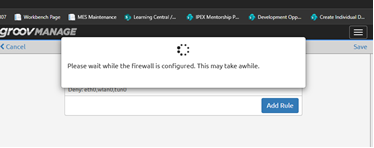
I then tried to make a firewall rule to open that port 14840, but there’s nothing in the firewall rules after I saved; even though it says it’s being saved:
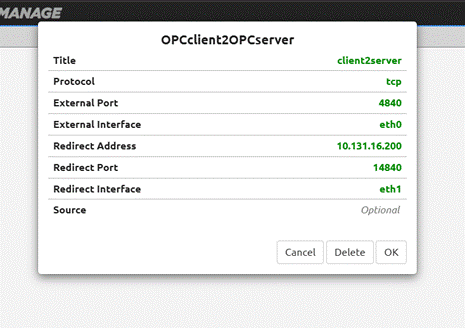
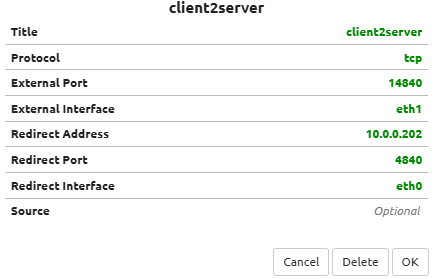
Think of port forwarding from the client to the server (inbound). The external interface and port would be the port the client connects to. If I understand what you are attempting, the external port would be 14840 on external interface eth1 which redirects to your server at 10.0.0.202 at redirect port 4840 on eth0 (Basically the reverse of what you have in your screenshot).
Hi Philip, thanks for the reply, I tried it and when I test TCP port on ETH1 10.131.16.200:14840 it still displays port is closed…and when I try opc.tcp://10.131.16.200:14840 with UA expert on my laptop, I have a timeout on the comms.
That looks correct. Remove any firewall rules you may have setup that pertain to this - they are not needed and maybe they are causing issues.
How are you checking if the port is open or closed?
Also, it appears that OPC UA servers respond with a endpoint with the local address, which the client may see and then try to use, and then fail to connect since it is unreachable. You may not be able to work around that. NAT doesn’t work in all scenarios - it is a hack.
Data Service and Codesys are disabled, and yes, network config is set to independent networks, what is weird is that when I’m in the firewall view everything is empty, I see my rule in port redirect, but when I try to also enable ports 14840 for eth1, the view is empty even though it says firewall is being configured…
The Test TCP Port doesn’t seem to work on redirected ports - just tested it locally, yet the port redirect does work. (Though, I am testing on an EPIC).
Firewall rules are not needed on port redirects.
Does your wago PLC have another standard TCP port you can test other than OPC-UA? Like modbus or http? Those will both normally work over port forwarding so you can rule out a network/setting issue on your RIO.
The WAGO needs to send the “public” IP/host as the endpoint. Currently, it is probably replying with 10.0.0.202 in the Get Endpoint payload.
I don’t know the WAGO setup, but AI says:
In your WAGO Web-Based Management (WBM), navigate to Fieldbus > OPC UA > Configuration. Set the “Alternate Host” or IP binding to match the public IP/hostname of the NAT router
So see if you can find that and setup an alternate host for 10.131.16.200:14840.

 Althought I’m not linux fluent…