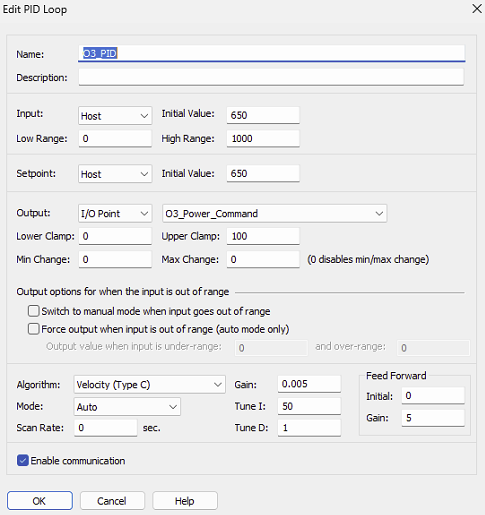
I’m troubleshooting an existing project at customer site that had a functional PID-loop which has stopped automatically updating it’s output.
It is a PAC-R1 controller, however, I noticed it does have an outdated firmware (10.4).
The latest changes to this system was a new PC which has the PAC Display that is linked with the controller. The new PC was updated to use the latest 10.6 PAC Project.
While online with the PAC Strategy, I can manually force a PID output value, and the value will reduce every scan time to quickly go to zero. The other PID parameters were not changed. I’m running the PID algorithm “Velocity (Type C)”.
I suspect it’s something simple, just strange how/why it has changed.
Thanks!
Hi Andre1. What I first noticed is that the Scan Rate is set to 0. The scan rate is very important because is sets how often the PID calculation will be performed. In general you take the lag time, how long it takes the process variable to react to a change in the output, and divide that time by 4.
I noticed the zero scan rate after I sent it… however, the actual scan rate was set to 1.0 seconds during my live run during testing.
I guess my main concern with this was the controller’s firmware (10.4) not matching the PAC strategy software (10.6)… could this have caused the issue if there were some updates to the PID loop?
No, the controller’s firmware version does not need to match the software version. What you want to check is the SNAP PAC controller firmware Readme to see if it mentions a bug that resembles what you see; also review the PAC Project (for PAC Control) Readme. There’s mention of a PID bug in the controller firmware file. See if that applies.
The 1 second scan rate is the default time set by PAC Control for PIDs and not likely the ideal scan rate for a process. Using the PID Demo mentioned before will get you to a better value.
I suggest contacting Opto 22 Product Support (it’s free) so they can help you with this issue.
There were quite a few PID issues mentioned that were changed since 10.5, and since my PAC-R1 has v10.4, there’s a good chance something is amiss (even though I didn’t see anything “specific” to the exact issue I witnessed).
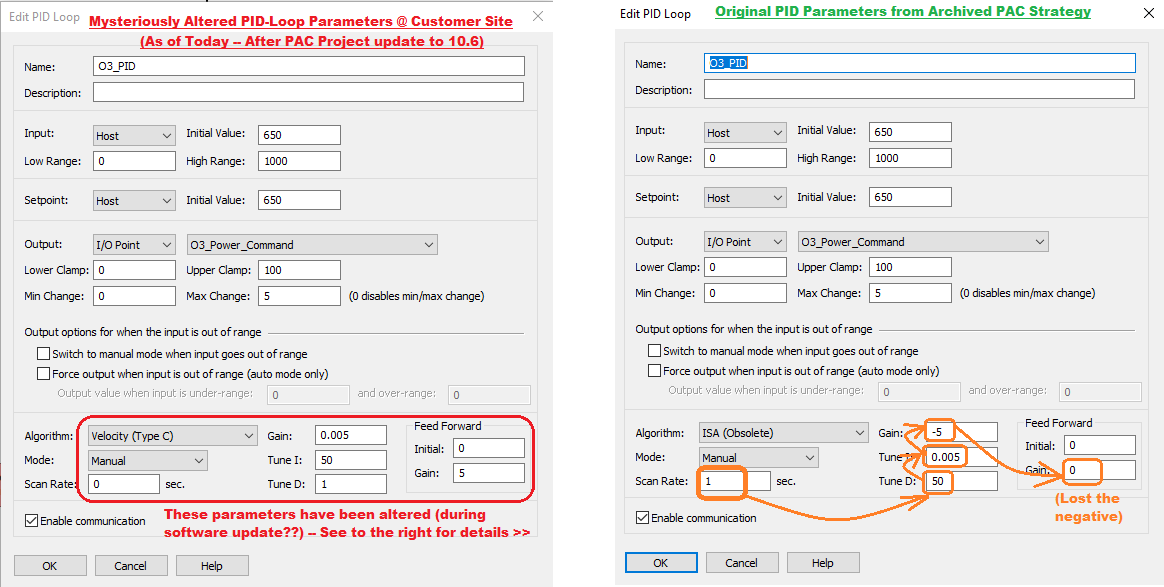
However, I did discover something that I found interesting that I’m quite confident is some type of incompatibility or bug since I upgraded the PAC strategy to 10.6. I found an older archived PAC strategy when it was originally downloaded to this PAC-R1 controller at this customer site, when all was working well. I was able to compare the PID-parameters from this strategy to the latest strategy that is running very “wonky”, and what was interesting was the somehow the values for these PID-parameters were still there, but NOT in the correct PID fields! As if these values were all shifted up or down one. See my attached image to explain and illustrate which fields got moved and where. The main concern was the “Gain” field, which changed from being a “negative” value to a “positive” value, totally changing (reversing!) the behaviour of the PID loop.
I have been able to revert the values back to their original now that I see what was altered… just figured this is not something coincidental, and I would suspect others might run into similar issues.
Thank you for your tenacious tracking of this problem and what looks like a bug. I’ll contact Product Support and direct them to this thread. They may need to contact you. Thank you, we appreciate you pointing this out.
Me, too. I was just now contemplating updating PAC Control to 10.6, but since our plant is running earlier PAC Control and earlier firmware in the controllers, I do not want to run into anything that will disable our system. We have a number of PIDs running in the existing strategy on various brains distributed throughout our system.
I’m curious if the Original Poster was able to get their system running by manually entering all of the PID parameters into their PIDs.
I will definitely put off updating anything until this is resolved.
I from migrated 10.5 to 10.6 and here is what I found:
1 I had my graphics utilize the dynamic attribute Auto/Manual Flag (See Help). After the migration, false became true and vice versa. I ended up changing all the attributes from the above to Is Manual? which is the preferred method anyways.
2 My graphics utilized PID outputs clamps. These were Output Lo Clamp and Output Hi Clamp. They did not work thus opto issued a beta fix for me = B10.6c Build 36.
After those changes it all worked fine. I did not encounter the originals poster’s issues, only mine above.