I searched, and didn’t find any threads about this.
We have a fairly complex control system, and in our PAC Display project for it, we have many different windows.
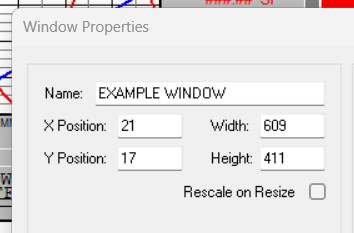
Whenever there’s a power failure, glitch, etc. that kills the PC on which we run PAC Display, when that PC is restarted we have to re-launch PAC Display. The problem is that with so many windows, it’s a royal pain to tediously find each window, move it to the correct (previous and preferred) position within the main PAC Display window, get them all set to the correct “Z order”, etc.
We have this all displayed on a 55” 4K display, but even that doesn’t let us show everything at once without sort of showing various windows as “pages” so we can click on the visible part of a window to bring it to the front, etc.
Anyhow, I figure there surely must be a way to set PAC Display to set and remember a particular window arrangement so it will either load that setup when launched the next time, or at least let us click on something to let it load up a particular saved arrangement.
It takes at least 15 minutes of messing around each time to get all of the windows positioned and in the right order again.
Maybe there’s a way to set up a script or something to do it for us.
I hate doing this every time, and the other plant operators really struggle with it whenever some crash forces them to re-launch PAC Display.
Thanks in advance for the time and effort to point me in the right direction on this.
The main problem I was having was because I was setting things up in configurator as a smaller window to fit on a smaller display because I didn’t want things to be invisible if the larger display failed (which seems to be a regular occurrence).
By using large monitor and maximizing the window for the configurator, I am able to get the positions of the various windows to come up in the positions I have them set for in the configurator. However, for some reason, the runtime does not “obey” the z-order of the windows that I set up in the “bring window to front” dialog. If there are windows that I want to have behind other windows, they often draw on top of, rather than behind, the window that should have the more “front” setting in that dialog or how they’re showing in the configurator.
So I’m now wondering if there’s a way to get the windows to come up in the runtime in the z-order that I desire.
Also, I’m not finding how to set which windows are opened on launch. Where in the runtime setup is that located? Maybe, because I’m not running the very latest version of the DAC Display Configurator, this is not available. I’m currently running R10.3c Build 0011
I don’t update things much on this PC because we keep it disconnected from the internet for security purposes. I could transport a later version to it via USB Memory Stick, however.
Varland:
I will need to do some studying to learn how to do what you suggest. Perhaps that would let me set their z-order explicitly?
Configure | Runtime, General, Draw Window Initial State section on the top left, check the Use Default box, and then click the Define Default… button to select your windows.
Since you have different window positions for different monitors, you will need to use varland’s method to move them since the X, Y for each window is a fixed value. Other option is to replace your monitors with ones that are the same resolution, like 3840x2160 (that is what I would do).
I saw that “Use Default” box, but rushed over it because I figured it would use some built-in default. I didn’t notice the “Define Default” button. That’s handy, and using that, it’s got things working very well now.
We don’t have room for another large monitor in this control room, but we would like to have one, of course. We might, however, be able to use a smaller monitor, but with the 4K resolution. It might be more difficult to read, but at least it would let us keep running.
What you’ve helped me with has it doing pretty much everything we need now. But I will look into Vorland’s method, too.