I’m working with options on how to move I/O unit channel values over into PAC Control using various commands. We have used the standard “Move I/O Unit to Numeric Table” commands with our G4 serial I/O units for decades, but obviously it is high time to migrate from G4 to SNAP I/O. I could continue to use the “Move I/O Unit” commands as we have always done (though with higher-density modules and mixed analog/digital I/O units it gets a little tricky), but I noticed that in PAC Control there is a new “Move Module to Numeric Table” command that was implemented in PAC Project R10.4, according to the release notes. I have looked throughout the latest PAC Control documentation (User’s Guide, Command Reference, Command Quick Reference, etc) and I can’t find any mention of that command. I tried using it in some logic, and for some reason I can’t get any digital input or output channel statuses in my table, even though the result of the command execution is 0 (usually meaning no issues). Analog works to some extent, but certain modules don’t seem to want to play nice either.
Can we get this command documented, along with some examples of use? That would help me out tremendously.
You appear to be correct. I looked in the latest July version of Pac Control Guide, and there is not mention of this command. In addition, I noticed that when highlighting “MoveModuleToNumTable” and then clicking on command help, it actually points it to the wrong command, “Set Module States from MOMO Masks”. I cold not find the command in either command help or in guide.
When selected in a script block, it does paste the usage and appears to be legit command.
Unless there is a problem with the actual command, the use should be straightforward.
I also noticed that when I attempted to select a variable using the Variable button, the Select Variable dialog box under Type: does not display IO Unit as a selection category, yet I can type it into the dialog and it will find it and accept it.
It does not error when correctly configured and compiled.
I did not test the operation, but there are obviously some updates needed. I would call tech support.
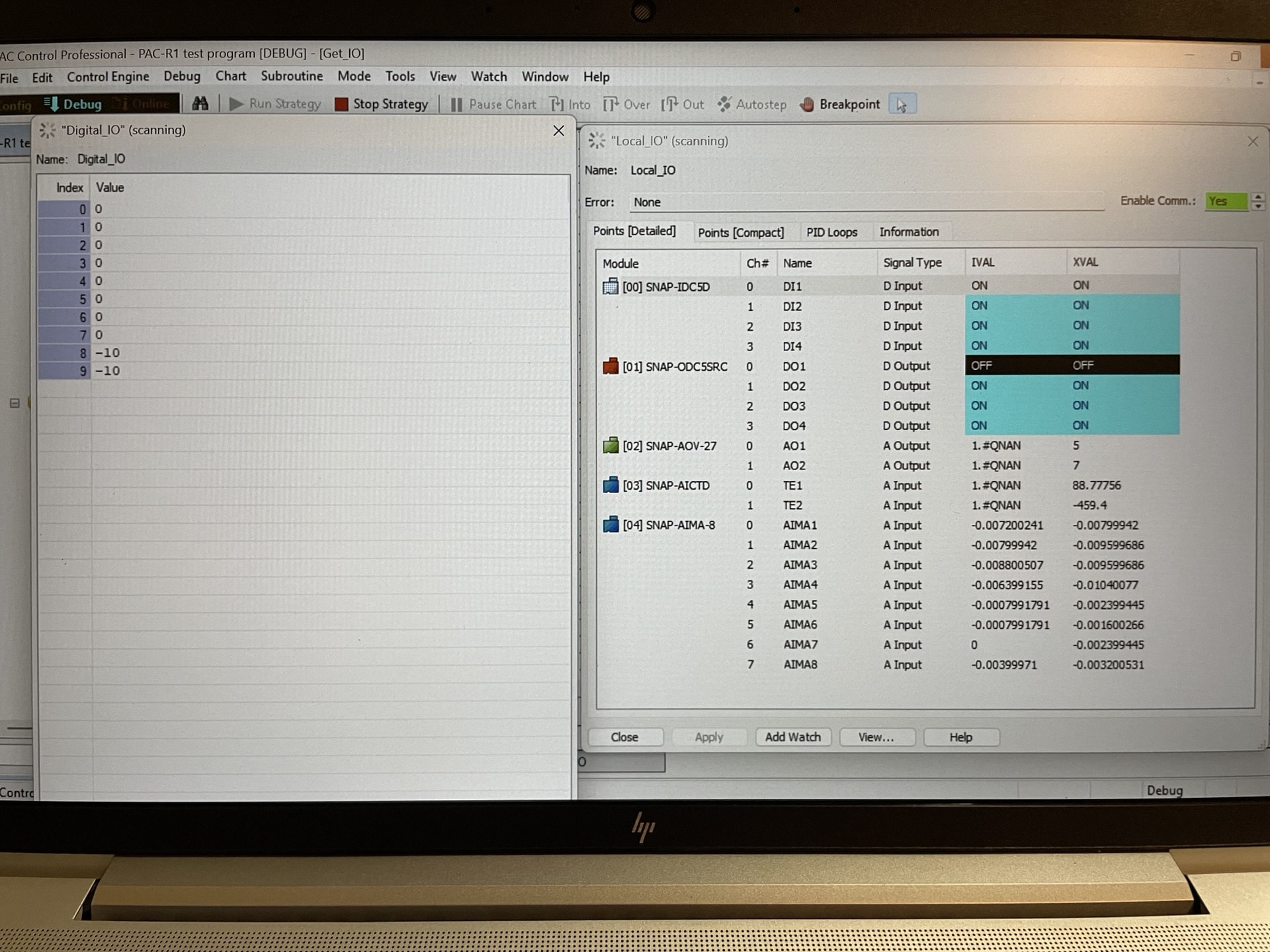
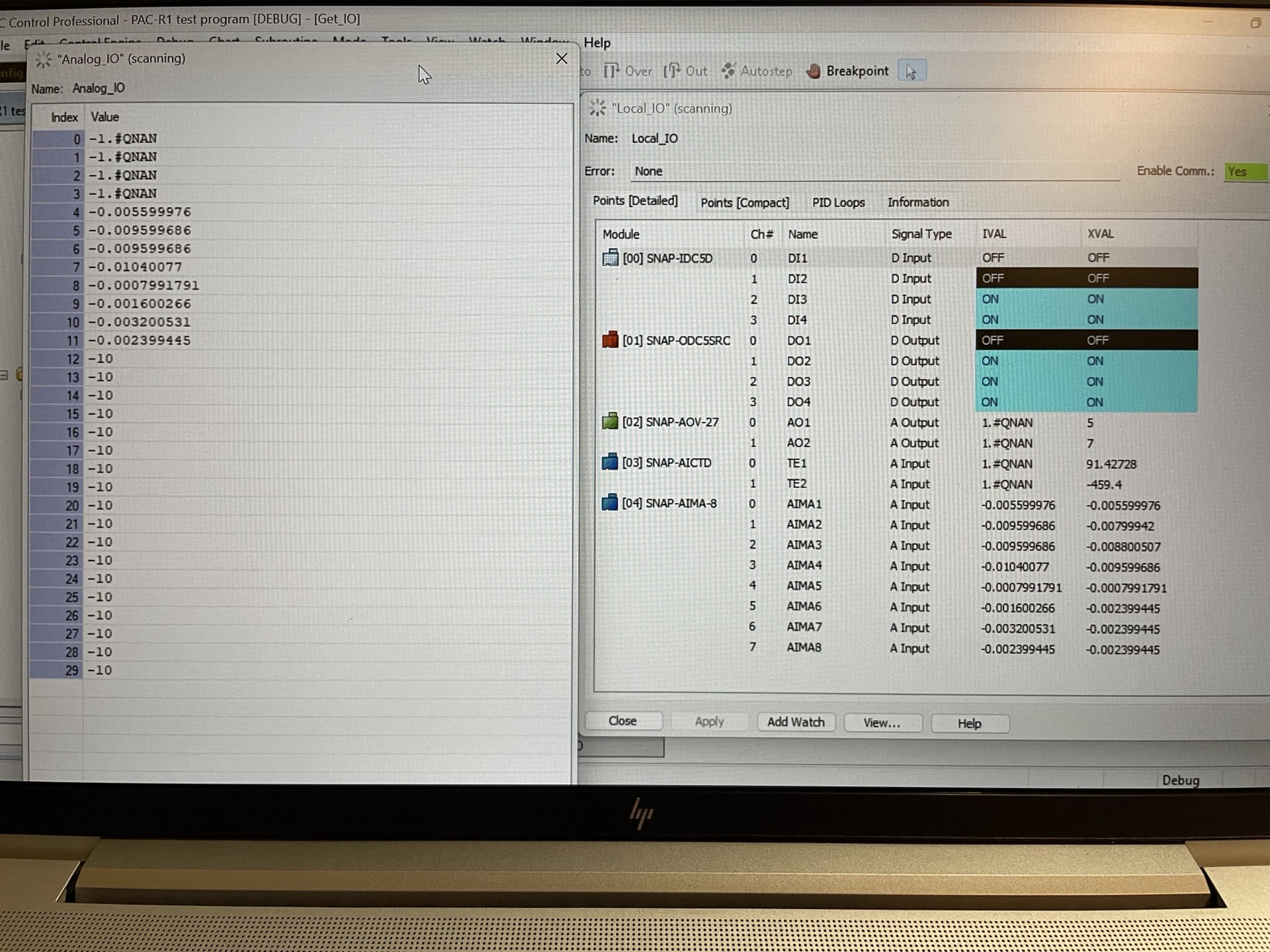
I used the Action Block version of the command as opposed to the OptoScript version, but they should operate the same. In my test rig (a SNAP-PAC Learning Center), I have a PAC-R1 updated to firmware R10.6b, a SNAP-IDC5D input module in slot 0 and a SNAP-ODC5SRC output module in slot 1. In the first Move command for the IDC5D, I correctly specify the I/O Unit, the module number (0), the table to move to (Digital_IO), and the table index to use (0). In the next Move command for the ODC5SRC, I again specify the I/O unit, the module number (1), the table to move to (Digital_IO) and the table index to use (4, since the first module channels should be in indexes 0 to 3). I get a result of 0 for both commands, which should be good, but the table contains nothing but zeroes, even with all inputs on and outputs 1 through 3 on. Similar issue with the analog modules in slots 2 and 3, which for the Learning Center are a SNAP-AOV-27 and a SNAP-AICTD. Even though I have output values set on the AOV-27 of 5V on channel 0 and 7V on channel 1 and I’m reading a temperature of 91 DegF on channel 0 of the AICTD, I only get “-1.#QNAN” values in my float table for those first four indexes, like it is only trying to read the IVALs and not the XVALs. Oddly enough though, I have an 8-channel SNAP-AIMA-8 module in slot 4, and the Move Module command works fine with the channel values for that module. Hence my confusion… I believe I am using the command correctly, but my results seem to indicate otherwise. Attached are pictures for clarifying my results.
Hi Kprickett, Thank you for this information. Please contact Opto 22’s Product Support (support@opto22.com) so that they can continue to help you with this issue. They are aware of this forum thread and are prepared to help you resolve this.