Anyone who can give some idea will be appreciated.
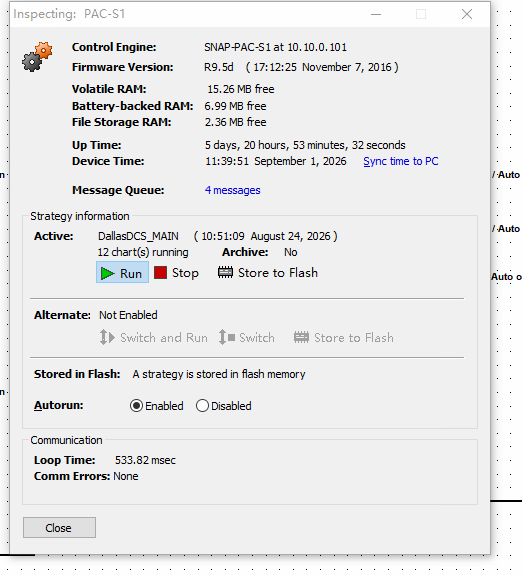
My PAC display version is R9.6d, and PAC-S1 firmware version is R9.5d. We got a problem that sometime the PAX display runtime reading values green or red, and the event log says reason : Comm Failure. It happens irregularly, sometimes it happens several times in one hour, sometimes only twice a week. As far as I can recall, this issue started happening since we changed the desktop windows from 7 to 11 around two years ago. Do I need to change back to win 7? Other information, we have 4 desktops running PAC display, and here is the PAC controller information picture.
Indeed, PAC Display 9.6 is only tested for Windows 10 Pro, and not for Windows 11 Pro, according to the 9.6 release notes.
If that causes this issue is not known.
The latest Version of PAC Display, Version 10.6, has support for Windows 11 Pro. To upgrade you need to upgrade the firmware of the SNAP-PAC-S1 and the PAC Display software.
Are all 4 Desktop PC’s scanning the PAC-S1 controller simultaneously?
Any changes made on the Refresh Time/Scan Rate in PAC Display?
Try to increase the timeout in the control engine
Are you using PAC-Display Professional and use the client/Server architecture?
Thank you very much for your help, and here is some further information:
Are all 4 Desktop PC’s scanning the PAC-S1 controller simultaneously? Yes.
Any changes made on the Refresh Time/Scan Rate in PAC Display? No, but we added about 20 new trends in recent two years.Now we have total around 400 trends with 1s refresh time, all trends data is saved on each PC’s SSD drive. Maybe this high load data logging cause the communication fail.
Try to increase the timeout in the control engine. Current read/write timeout : 3 seconds.
Are you using PAC-Display Professional and use the client/Server architecture? No, we just have 4 PCs scan the controller through a network switch.
Oh yah, that would produce a fair amount of load, I have had 80 trends with similar update rates, but I only had several PCs hammering the S1’s. 400 trend times 4 = 1600 requests per second…and that’s just for the trends.
If you really need all the PCs displaying all 1600 trends, you have to set up all your refresh rates to reasonable levels (no 10ms, 50ms refresh rates) and make sure all of the refresh rates are staggered based on prime numbers. Make up a number of refresh rates and go through all of Pac Display screens and change the group numbers to an appropriate refresh rate. You can do this by using “replace” group on each screen. Use rates like 0.71, 0.83, 0.97, 1.07, 1.27 seconds and so on.
Your other choice is to use Pac Server (I guess it’s pac server, used to be Opto Server) and go through the somewhat painful process of setting that up, then you will not have problems with polling rates. If you’re not familiar, Opto Server once set up, allows all the other PC’s to poll it, then it consolidates all those polls and polls the S1 only once for each group request. Massive difference.
Be sure and make the changes to all the pages to the group refresh rate values after making the new rates. I use the Launch TagInfoView Utility and Find Tag under View in pac display config. You can find what groups are what in there then use Find/Replace to change them.