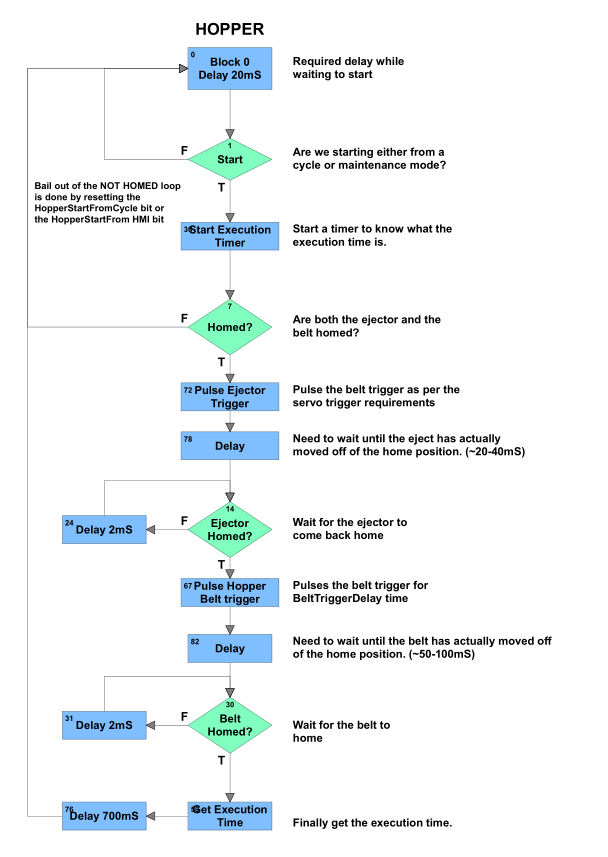
I am working on a chart for a GRV-EPIC-PR1control unit that will activate a pneumatic cylinder,wait for it to complete (come back home), then activate a belt to advance product, then wait for it to return home again. This chart has a few delays sprinkled throughout to make sure, that the devices actually activate and leave home before checking to see that they have come back home. There are also delays used while waiting for them to come back home.
When PAC control is in debug mode with auto step, everything works and is predictable. Without auto step, it seems that none of the delays are being honored. I suspect some of these delays are too short, but I’m not sure how short would be considered too short. If have seen this thread and I’m pretty sure I’m dealing with the same issue, but I’m not exactly sure how it relates to my chart.
Can anyone make suggestions regarding how to modify the following chart to overcome this?
Let’s assume that the delays are working as they should (they are).
The most likely issue is the ejector moving from the home position and for the I/O or however that is being determined is taking longer than you expect.
It would be better practice to not rely on delays, but rather to check the IO that the ejector has left before checking if it came back home. If this is a brief period, you may want to clear and check the off latch.
I’m certainly not going to say this issue is not from the way I am handling the logic, but when I put the chart in auto step, everything works fine. I can change the delays by a large amount and everything responds as I would expect. Take it out of auto step and the world does not appear correct. Changing the 700mS delay to 7000 mS makes no difference in how devices are responding. I would think that I would notice a ten-fold change in an outer loop delay. Either way, I do see how I can change the logic and make it more robust, so I’ll try that before anything else.
Very strange and I’ve never seen what you described outside of communications links which required a longer delay which autostep created. When we adjusted said delay everything worked.
The question (and I realize it sounds crazy) what command are you using for your delays (or how are you delaying)?
Use the DelayMsec all the time and never had it break so maybe the logic delay may not be the issue. You could try another controller (if possible) to eliminate that as an issue (or reload the firmware).
Can you setup another chart that resets/starts an up timer, goes to a DelayMSec block (set via a I32 variable so you can adjust timing), next step is move value of timer to a float then loop back to the first block (reset / start timer). The float should be close to the delay you entered. This will at least prove if the DelayMSec delay works or doesn’t work (at short and longer delays). If it works then move to the next step.
You noted that “Changing the 700mS delay to 7000 mS makes no difference in how devices are responding. I would think that I would notice a ten-fold change in an outer loop delay.” then is it possible your code is getting hung up elsewhere in the chart (how you read IO, etc.) ?
Add a tracer in your chart after the various steps so you can monitor without being in autostep (if it gets hung up at a particular number then you know where in the logic you have an issue). Its a simple approach that may help identify another problem. You could also use a float table to record times, etc. but the goal is a means to trace your logic.
Hopefully one of the ideas above will flag where the issue is on a problem that no one has seen, of course there always a first for everything. Please update us on what you find
I need to put an apology to the community here. I was trying to read the digital inputs with an Equal? function not a proper read digital command. Once I made that change, my world turned right-side-up once again.
Is your “digital_in” a numvar integer or the direct IO point name on the module? because typically if it is a direct to IO then you would use the command “is on” or “is off”, or you would use the “move” command first, and then use == on the nv …