
I’d call that an “undocumented feature”!
You can also use the Text Area gadget, shown at the bottom of these three options here:
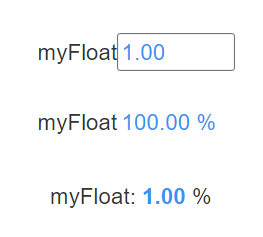
Here’s a few other notes on text/etc from an older post:
One UI side-note and a pet peeve of mine: do not use that top one (Text Box) for a value that can’t be changed. For example, someone added a value onto a page in our own internal Opto 22 groov pages for “Outside Temperature” but they added it as a Text Box, implying one could type a new number in there that might be more to there liking.
That would be a pretty powerful control program! 