
Hello karstensson,
Welcome to the OptoForums! There are a few different ways to approach this, depending on what your big-picture goal might be.
FANCY OPTION:
In this post I wrote about an application where someone wanted to be able to switch between using real hardware and using simulated values. I explained how to use PAC Control’s “Simulation” category of commands in a little logic in a chart.
But that might be more complicated than you need.
SIMPLER METHOD:
In our [U][B]PAC Project Demo package[/B][/U] (is that what you started with?) the logic for the bottling plant just points to variables (floats, ints) instead of I/O points. You’d just need to change your PAC Display project to point to the real hardware instead of the “fake” variables if/when you switch.
DEAD-EASY WAY:
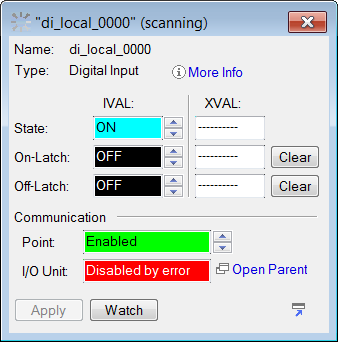
From within PAC Control’s debugger you can change the IVAL of your non-existent digital input as shown here:
Also…
Our nifty groov product ([U][B]free trial click here[/B][/U]) provides some other interesting options too–does your project require PAC Display, or could groov work instead or in combination?
Can you tell us a bit more about what you’re up to there?
Thanks,
-OptoMary