
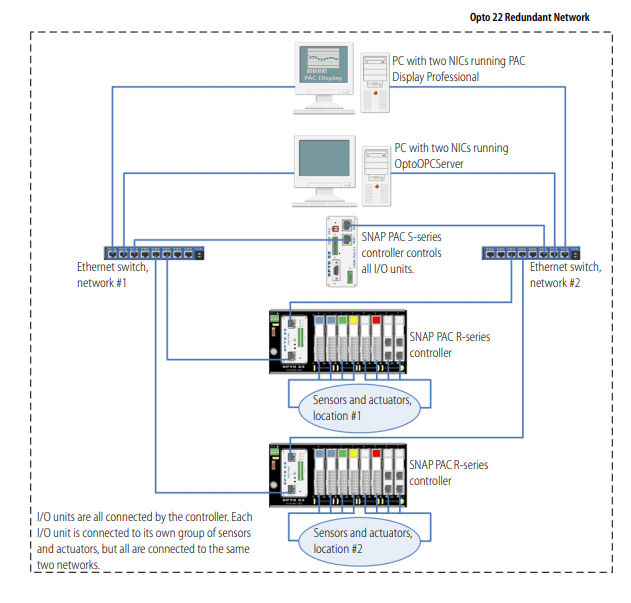
Sounds like this diagram (from the SNAP PAC S-series users guide).
So to try and answer each of your points.
- You are not really mixing redundant and non-redundant products as each network is carrying all the traffic regardless of the other networks state.
In other words, the IP data is free flowing on each network. You can put a groov AR1 on network #1 or network #2 and it will see all the tag data regardless of which network you chose to put it on.
There is nothing to switch, detect or automate. IP traffic is IP traffic and all the I/O point data is on both networks equally. In other words one network is not active while the other inactive, both are fully active at the same time. - If you put two AR1s in the mix you will be fine. The pointless thing to do would be to put an AR1 on both network legs. While nothing bad would happen, you don’t have a third network port on the AR1 to connect with your office/Internet network so there would be no way to view your groov View screens outside of the two control networks. (Yes, you could try and use Wifi as the third network and have it join your office Wifi, but Wifi in this application is hard to recommend due to its lack of reliability).
Also putting two AR1s in the mix would then bring about the need for a hardware load balancer (linked in my previous reply). Or you could simply hit one AR1 host name and if groov View shows a bunch of broken tags you would know that that network is down and you need to hit the host name of the other AR1. - Yes, this is the job of the hardware load ballancer. It detects (PING and other ways) which network and hosts are up and switches to the active one. They are expensive devices, but you might check out Mikrotik and Ubiquity. They have some smart features built into their products and are priced right.