
Instead of saving data to your groov box hard drive you can also use Node-RED to email trend data to any address or addresses you want as an attached CSV file.
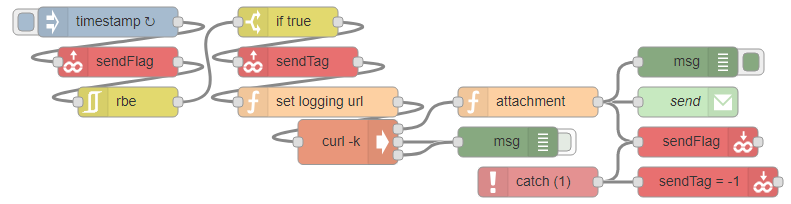
Using groov read nodes you can also make gadgets to set exactly which tag to send, and have a send button on a groov page, with no further interaction with Node-RED! Here’s the flow I have to send either temperature, humidity, or solar radiation trend data to my email:
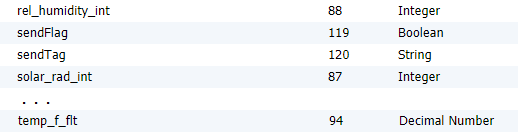
Where these are the relevant tags I have set up in my WeatherData groov data store:
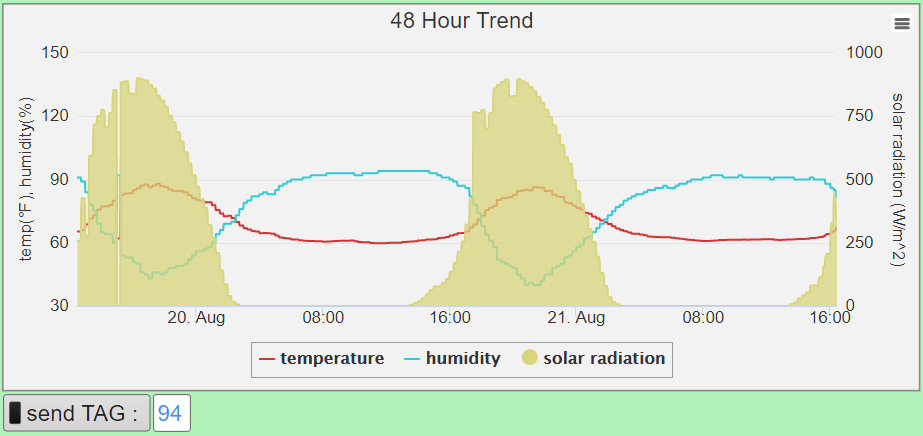
With a groov page that has a 48 hour trend gadget plotting temp_f_flt, rel_humidity_int, and solar_rad_int, as well as an indicator button for sendFlag and a text box for sendTag:
Once every second the flow scans the boolean sendFlag into msg.payload, uses rate-by-exception to see if it has been toggled, then if msg.payload == true the button must have been turned on.
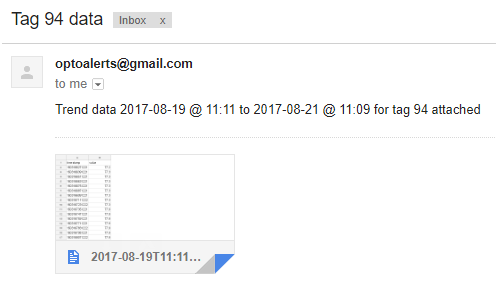
When that occurs Node-RED then reads the data store value in sendTag and uses it to build a download URL which gets the CSV data from the given trend using curl, takes the first and last epoch timestamps to build a file name and email body that records the time range of the data, then sends the email off while writing the sendFlag boolean button back to false so another trend can be sent.
It is important to note that using this tag field method, the tags must be in the same trend.
Take a look at these two URLS:
https://127.0.0.1:8443/api/v0/data-logging/94_0_2880_120_false/scanned-data.csv?api_key=3rWGiMK6ARtxk7AXEY4cXhGByCcAZAGK
https://127.0.0.1:8443/api/v0/data-logging/94_0_10080_300_false/scanned-data.csv?api_key=3rWGiMK6ARtxk7AXEY4cXhGByCcAZAGK
See that both use the tag 94, temperature, but the rest of the logging field is different. 2880_120 is the 48 hour tag, and 10080_300 is a week long trend. You could also enter these in another field, or just build a different flow and set of sendFlag / sendTag gadgets for each trend.
So for this flow I can freely enter 88 for humidity, 87 for solar radiation, or 94 to get Fahrenheit temperature from the 48 hour trend, where each is referenced by the Tag ID number in the groov data store. If an invalid tag ID is entered, the catch node overwrites -1 to the tag ID to let you know it didn’t work, and resets the toggle button.
Once a tag is entered I can send the tag using the toggle button and have the file emailed to any account I enter into the email node, or using the to, cc, or bcc fields in the attachment function node.
Happy coding!
[{"id":"f0389641.737b28","type":"exec","z":"e7108e55.3fa88","command":"curl -k","addpay":true,"append":"","useSpawn":"false","timer":"","oldrc":false,"name":"","x":550,"y":1260,"wires":[["83678c51.86334"],["2651a91f.e93666"],["2651a91f.e93666"]]},{"id":"2651a91f.e93666","type":"debug","z":"e7108e55.3fa88","name":"","active":false,"console":"false","complete":"true","x":710,"y":1260,"wires":[]},{"id":"6f3b4317.043b8c","type":"function","z":"e7108e55.3fa88","name":"set logging url","func":"// ALWAYS change \"host name\" to \"127.0.0.1:8443\" and leave the rest of the string the same.\nreturn {\n payload : \"https://127.0.0.1:8443/api/v0/data-logging/\"+msg.sendTag+\n \"_0_2880_120_false/scanned-data.csv?api_key=3rWGiMK6ARtxk7AXEY4cXhGByCcAZAGK\",\n sendTag : msg.sendTag\n};","outputs":1,"noerr":0,"x":520,"y":1220,"wires":[["f0389641.737b28"]]},{"id":"83678c51.86334","type":"function","z":"e7108e55.3fa88","name":"attachment","func":"start = msg.payload.indexOf(\"\\n\");\nend = msg.payload.indexOf(\",\", start+1);\nf = new Date(parseInt(msg.payload.substring(start+1, end))- 7*3600000);\n // for UTC-7:00 timestamp offset: <(parseInt(..(..)) - 7*3600000)>\nfirst = f.toISOString();\n \nend = msg.payload.lastIndexOf(\",\");\nstart = msg.payload.lastIndexOf(\"\\n\",end-1);\nl = new Date(parseInt(msg.payload.substring(start+1, end))- 7*3600000);\n // for UTC-7:00 timestamp offset: <(parseInt(..(..)) - 7*3600000)>\nlast = l.toISOString();\n\nmsg.attachments = [{\n filename: first.substring(0,16) + '--to--' + last.substring(0,16) + \".csv\",\n // filename = \"yyyy-mm-ddThh:mm--to--yyyy-mm-ddThh:mm\" trend start date_to_trend end date\n content : msg.payload\n }];\n \nmsg.payload = \"Trend data \" + first.substring(0,10)+\" @ \"+first.substring(11,16)+\" to \"+\n last.substring(0,10)+\" @ \"+last.substring(11,16)+\" for tag \" + msg.sendTag + \" attached\";\nmsg.topic = \"Tag \" + msg.sendTag + \" data\";\nreturn msg;","outputs":1,"noerr":0,"x":730,"y":1220,"wires":[["8515c0b3.249c","24dfed2.1b3a912","c4569ad5.8e3a88"]]},{"id":"8515c0b3.249c","type":"e-mail","z":"e7108e55.3fa88","server":"smtp.gmail.com","port":"465","secure":true,"name":"email@address.com, secondary@recipient.com","dname":"send","x":890,"y":1220,"wires":[]},{"id":"7e800f5b.c7494","type":"groov-read-ds","z":"e7108e55.3fa88","dataStore":"4d99020c.a9acac","tagName":"sendFlag","tableStartIndex":"","tableLength":"","value":"","valueType":"msg.payload","topic":"","topicType":"none","name":"","x":320,"y":1180,"wires":[["f0c56b9b.847008"]]},{"id":"c1b6b855.ad9638","type":"inject","z":"e7108e55.3fa88","name":"","topic":"","payload":"","payloadType":"date","repeat":"1","crontab":"","once":true,"x":310,"y":1140,"wires":[["7e800f5b.c7494"]]},{"id":"f0c56b9b.847008","type":"rbe","z":"e7108e55.3fa88","name":"","func":"rbei","gap":"","start":"","inout":"out","x":330,"y":1220,"wires":[["77d86baf.712d64"]]},{"id":"77d86baf.712d64","type":"switch","z":"e7108e55.3fa88","name":"if true","property":"payload","propertyType":"msg","rules":[{"t":"eq","v":"true","vt":"jsonata"}],"checkall":"true","outputs":1,"x":490,"y":1140,"wires":[["ddc0f0fd.5eb58"]]},{"id":"24dfed2.1b3a912","type":"groov-write-ds","z":"e7108e55.3fa88","dataStore":"4d99020c.a9acac","tagName":"sendFlag","tableStartIndex":"","value":"false","valueType":"value","name":"","x":900,"y":1260,"wires":[[]]},{"id":"c4569ad5.8e3a88","type":"debug","z":"e7108e55.3fa88","name":"","active":true,"console":"false","complete":"true","x":890,"y":1180,"wires":[]},{"id":"ddc0f0fd.5eb58","type":"groov-read-ds","z":"e7108e55.3fa88","dataStore":"4d99020c.a9acac","tagName":"sendTag","tableStartIndex":"","tableLength":"","value":"sendTag","valueType":"msg","topic":"","topicType":"none","name":"","x":500,"y":1180,"wires":[["6f3b4317.043b8c"]]},{"id":"6478babd.ac1a54","type":"catch","z":"e7108e55.3fa88","name":"","scope":["83678c51.86334"],"x":740,"y":1300,"wires":[["24dfed2.1b3a912","f0af4acd.7e6068"]]},{"id":"f0af4acd.7e6068","type":"groov-write-ds","z":"e7108e55.3fa88","dataStore":"4d99020c.a9acac","tagName":"sendTag","tableStartIndex":"","value":"-1","valueType":"value","name":"sendTag = -1","x":910,"y":1300,"wires":[[]]},{"id":"4d99020c.a9acac","type":"groov-data-store","z":"","project":"cb2b7005.0a753","dsName":"WeatherData"},{"id":"cb2b7005.0a753","type":"groov-project","z":"","address":"localhost"}]